Sunday, January 10, 2010

How to choose a Linux distribution flow chart

How to choose a Linux distribution flow chart: "

The new year is here and you have made a resolution to give Linux a try. A noble resolution and one that will be met, initially, with much confusion. Why? Linux isn’t like Windows where your choice is limited to a single release with different features (depending upon how much you want to spend) or OS X where you have no choice but to take what Apple gives you. No. Linux has a multitude of choices. In fact, if you go to Distrowatch you will see at least 100 distributions listed in the page hits ranking section. Think about it, 100 different versions of Linux. And that’s not all of them. There are many more variations out there, and more coming every day. And then, you add into the mix the enterprise level distributions that not only come with a price, but support, and the ever-staggering number continues to grow.


So how does a new-to-Linux user decide? With so many choices, how is it possible to start off on the right path? Without help, it’s not easy. My first Linux distribution was Caldera Open Linux 1. It was rough and nearly pushed me back to Windows. It wasn’t until I found Red Hat (4.2 at the time) that I found the right distribution for the right purpose. That was ten years ago and the choices were much more limited.


Because the new year is here, and I am always one to want to help people make the move to Linux, I thought I would create a flow chart to help Linux users make the right choice. Is it perfect? Probably not. Do I include every possible choice? No way. The distributions I have included are:


  • Ubuntu
  • Ubuntu Server
  • Ubuntu Studio
  • Slackware
  • Fedora
  • Red Hat Enterprise Linux Desktop
  • Red Hat Enterprise Linux Server
  • SuSE Enterprise Linux Server
  • SuSE Enterprise Linux
  • Gentoo
  • Mandriva Power Pack
  • CentOS
  • PCLinuxOS
  • Linux Mint
  • Debian

It’s still a healthy list of distributions, but not everyone. And I’m sure there will be those that disagree with my approach. That is understandable. So much so, that I am (in the spirit of open source) including my .dia file for the flowchart. NOTE: The .dia file is hosted on my domain (outside of ghacks). I would love to see how readers change my flowchart to better fit their opinions/experiences.
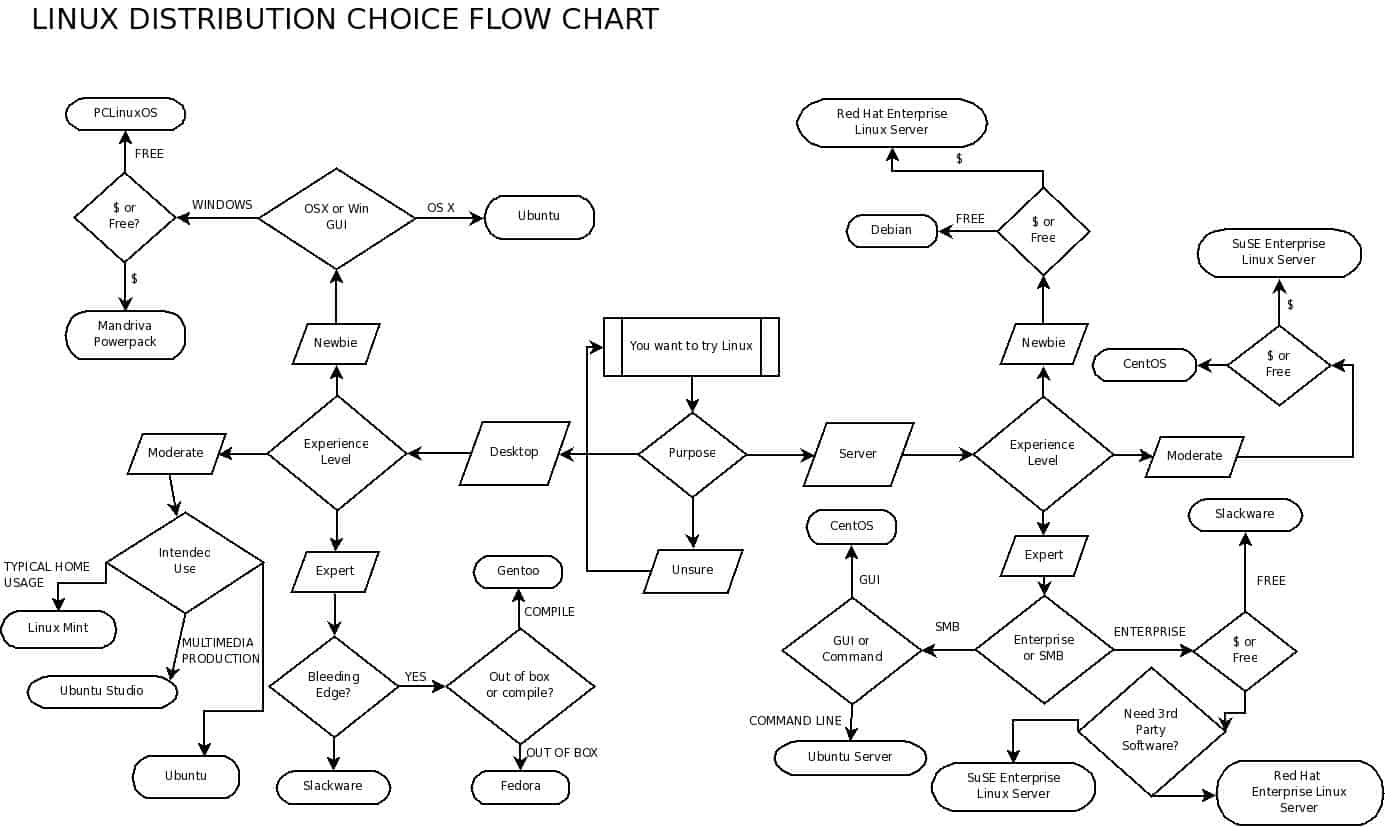

Figure 1


But for those that do not want to bother messing with editing the flowchart, and just want to see it in all its scattered “glory”, take a look at Figure 1.


One of the first things you might notice is the predestination paradox (temporal causality loop) I created for those unsure of their purpose for choosing Linux.


There might also be some initial confusion as to why I have included, in some choices, distributions that are rather similar. For example: The difference between Mandriva and PCLinuxOS might not be that great, but notice I have included the Mandriva Power Pack which includes pre-installed flash, various codecs, and Mandriva support.


Final thoughts


I hope this flowchart makes your choice of Linux an easier one. Even more, I hope this flow chart helps you to start your new year off on an open source foot, and that you find this path a rewarding one.

Friday, January 8, 2010

Cheers To Finger Power!

Cheers To Finger Power!: "

Mind you, this is not a “Green” concept and neither does it claim to be “Eco Friendly”. It’s just a helpful solution for a tricky situation. The situation being: you running out of juice on your mobile phone. So what do you do? Remove the battery from the back of the phone; give it a few good turns around your index finger and its gathered enough power to last you a conversation or a safe trip to your charger and electric point.


Designers: Song Teaho & Hyejin Lee


Swing Your Energy - Mobile Phone Battery Charger System by Song Teaho & Hyejin Lee


swing_your_energy2


swing_your_energy3

"

Monday, December 28, 2009

Mozakerty is now online

Mozakerty is now online: "


What is Mozakerty ?

A new tool for communication, collaboration and interactivity between student members and the teaching staff.


What is Mozakerty for ?

  • Establishing studying community to ease studying online and Share information.
  • Discover a new way of studying, scheduling, and organization of study materials.
  • Making resources available for every one.
Why Mozakerty ?


  • Tired of papers ?
  • Tired of unorganized documents everywhere ?
  • Some questions are repeated over and over again ?
  • Is there new lectures ?
  • What will be delivered this week ?
  • Want to be notified of new events and lectures ?
  • What is tomorrow schedule ?
  • Want to share questions, answers, notes ?
  • Want a new way to study ?
Here is the solution: Mozakerty


What exactly does Mozakerty stand on ????

  • Model ? we already have one.
  • Forum ? we already........etc.
  • Group ? we ....bla bla bla
  • Social community ? we have facebook, twitter, ....etc.
What about All of these features in a new way to study ? Moakerty.


Mozakerty is developed by me and 5 of my friends (5 months working)

for more technical info on Mozakerty visit this site's page here.


"

Wednesday, December 23, 2009

Microsoft Security Essentials Ranks as Best-Performing Free Antivirus [Antivirus]

Microsoft Security Essentials Ranks as Best-Performing Free Antivirus [Antivirus]: "

Anti-malware testing group AV-Comparatives.org not only gave Microsoft Security Essentials a top rating for malware removal, but now they've given it their best ranking in their performance test as well.

AV-Comparatives.org ran a series of real-world tests running through common scenarios like downloading, extracting, copying, and encoding files, installing and launching applications, and they also ran through an automated testing suite as well. Once the dust had settled, it became clear that not only is MSE one of only three products that both blocks and removes malware well, but it's also very light on system resources.

Out of all the products tested, Microsoft Security Essentials was the best-performing free antivirus solution, and one of only two that received 'very fast' on each of the real-world tests, earning it their top award: an 'advanced+' ranking. We've been telling you for a while that you don't need to pay for Windows security, and now with MSE ranked alongside the top paid apps in both malware removal and performance, you might want to consider making the switch.

Hit the AV-Comparatives link for the full report in PDF form, or check out the PC Mag story for the overview—if you can deal with some irritating in-text ads.


Saturday, December 12, 2009

Google Chrome Gets an Adorable New Ad [VIDEO]

Google Chrome Gets an Adorable New Ad [VIDEO]: "

chrome osWith Google Chrome now available on the Mac, there’s more buzz than ever around Google’s speedy, lightweight browser. Now Google in the UK has created a 4-minute introductory video for would-be Chrome users, featuring pin-boards, graffiti and even some knitting.


We think it’s fantastic; clearly huge amounts of effort went into what could have been another boring introductory video.

What do you think: Is this better than a screencast? Let us know in the comments.