Showing posts with label Browsers (IE-FireFox-Opera-Safari-Chrome ... etc). Show all posts

Monday, March 7, 2011

Firefox 4 also crashing due to outdated graphics drivers

Firefox 4 also crashing due to outdated graphics drivers: "firefox 4 video crashAfter reading a new post from Mozilla, it appears as though Google isn't the only browser maker having a hard time with outdated graphics drivers. As Mozilla inches closer and closer to the final release of Firefox 4 -- which, of course, packs hardware accelerated rendering kung fu -- the company's Benoit Jacob has posted a plea to its users.


Please update your graphics drivers.


Like Google, Mozilla has noticed higher volumes of crash reports from Firefox 4 users who were running stale drivers. In addition to offering a general reminder to update your drivers, Mozilla has also posted a listing of the video card drivers which have been added to the Firefox 4 blocklist. If your driver is listed, it's imperative you update if you want to get the best performance out of Firefox 4.
Firefox 4 also crashing due to outdated graphics drivers originally appeared on Download Squad on Mon, 07 Mar 2011 08:00:00 EST. Please see our terms for use of feeds.

Friday, November 5, 2010

Moonlight


want to browse sites that work with MS Silverlight while you are in linux and u don't know how
Moonlight is the Linux version for Microsoft Silverlight

Friday, October 22, 2010

Microsoft to Launch Browser-based Game Store

m


On November 15 Microsoft will launch Games for Windows Marketplace, an online store that will let users buy digital copies of games directly from the browser.
Besides online access from any computer, key features of the store are “ultra-fast” downloads, search by titles or by genres, clean navigation as well as deals and discounts, including “Deal of the Week” and other recurring and seasonal offers.
Users will be able to purchase games with their Microsoft Points or a credit card.
The Games for Windows Marketplace is, in a way, a browser-based version of Microsoft’s Windows Games on Demand store, which is a part of its Games for Windows Live online service. By placing the store in a browser, Microsoft eliminates a couple of steps needed to purchase a game.
“With Games for Windows Marketplace, we set out to create a digital store built for PC gamers end-to-end. And by integrating with our existing Xbox LIVE and Windows Live services, we’ve made it easier than ever for millions of gamers to see for themselves how easy buying PC games can be”, said Kevin Unangst, senior global director of PC and Mobile Gaming at Microsoft.
At launch, there will be about 100 games available at the store, including Grand Theft Auto III, Dead Rising 2, Lost Planet 2, Max Payne, Deus Ex: Game of the Year Edition, Flight Simulator, Gears of War, Halo, Zoo Tycoon, Fable III, Age of Empires Online and Microsoft Flight.
Source: http://on.mash.to/9qAQCl

Wednesday, September 15, 2010

Internet Explorer 9 Has Arrived


Microsoft is pulling out all the stops to mark the launch of the open beta for Internet Explorer 9, a web browser the company promises will “beautify the web.”

The IE9 beta launches today here at the Design Concourse Center in San Francisco with a major gala that includes hundreds of developers, journalists and Microsoft employees, as well as a live band playing on pedestals in the lobby.

“The browser is a stage. It is the backdrop of the web,” said Corporate Vice President of Internet Explorer Dean Hachamovitch.

Microsoft says that IE9 is a reinvention of the browser. It not only includes greater HTML5 and web standard compliance, but also the ability to turn any website into an application on the Windows taskbar. Thee websites are pinned to the taskbar, providing users with a one-click option to a their favorite websites. It also includes Windows 7’s jump lists; any website that supports them will provide a quick menu to its most popular webpages.

The focus of IE9 is on the “regular consumer,” which may irk those of us who generally have more than 10 or 20 tabs open at any given time. Tabs appear on the right side of the address bar, decreasing the amount of real-estate for tabs. To help decrease tab overload, they are grouped based on different websites within the taskbar.

Perhaps IE9’s biggest selling point is hardware acceleration. The company has used four developer previews to show off the speed of IE9 compared to its competitors. IE9 harnesses the PC’s hardware to accelerate graphics, videos and text. The result is that IE9 is able to render heavy graphic interfaces far better than even Chrome or Firefox.

The IE9 beta is available for download today on the Beautify the Web site Microsoft has launched as part of its promotional campaign. We have had access to the IE9 beta for a while now and will be posting our thoughts and reviews soon. In the meantime, let us know whether you believe Microsoft can get back into the browser game with IE9.

Tuesday, July 20, 2010

Google Chrome, Problems Downloading Large Files

Google Chrome, Problems Downloading Large Files: "
For the last days, the developer version of the Google Chrome web browser has had troubles downloading large files from the Internet. Downloads of files with a minimum size of 50 Megabytes, stopped abruptly at about 30 Megabytes.
Retrying the download yielded the same results. The first thought was that this was related to a single file or server, that acted up strangely.
But the problems persisted and after trying to download a dozen different files, all with a file size of 50 to 200 Megabytes, it became clear that Google Chrome was the problem.
Examples of files are the Emsisoft Emergency Kit with a size of 103 Megabytes, some Mediafire downloads with a size of about 180 Megabytes each, and downloads over at Softpedia, like Kaspersky’s Small Office Security.
All downloads stopped at approximately the same size, 36.7 or 36.8 Megabytes. File extensions were also different, including archive formats like zip or executables like exe.
There does not seem to be a fix for this issue yet, and it is not clear if all Chrome versions are affected or only the latest developer release, version 6.0.466.0.
All downloads were completed successfully in other web browsers like Firefox, which seems to confirm that this is a Chrome-only problem. This also is the workaround for users who experience the same download problems.
The test system was running Windows 7 Pro, 64-bit. Have you been experiencing the same troubles? Let us know in the comments.

© Martin for gHacks Technology News, 2010.

Tuesday, July 13, 2010

Marginize :Don't browse alone!

One day we got this call from Ziad Sultan, a young and enthusiastic entrepreneur from Boston, MA, and he had this crazy Idea. His vision was to create a margin to websites… creating an augmented or meta web, where people can share their thoughts in real time on any website. eSpace created a team working very closely with Ziad, and over the months the startup, Marginize was created, enrolled in TechStars, and a mere three months later graduated being the only company succeeding in raising the money it needed even before the end of the event. The aspiring story about Dharmesh, a very successful entrepreneur and angel investor, sending his interest to invest in Marginize through marginize was the talk of the community in Boston for a while now. Around the same time as the TechStars event, which eSpace had the privilege to attend and catch on the fever, Marginize was featured in TechCrunch and a featured app for Google’s Buzz.


Read more...

Download it.

Tuesday, October 6, 2009

Web Browsers for Dummies

Considering the amount of time everyone spends online today, it is funny that many people still don't know what a web browser is, even though they use it every day.

The following video is a questionnaire conducted by Google while promoting their browser Chrome, and it shows that many people don't know what a browser is, or they confuse a browser with a search engine. Only a few people answered correctly.


It also seems that Google is determined to educate people on what a browser is. The latest post on the Official Google Blog has a quick comparison showing that people spend way more time on the web than they spend in their car. However, they are more likely to know which car they are driving than to know which browser they are using.

The author of that post, Jason Toff, created a small video clip explaining what a browser is. It is intended for those who know almost nothing about the computer's technical terms. Take a look:


In addition, Toff has also created a simple site, WhatBrowser.org, that gives even more information about browsers. On this site, you can see which web browser you're using, explore links to browser diagnostic tests and read some useful tips for getting the most out of your browser.

So, do you know which browser you're using?

Thursday, September 24, 2009

Google Chrome Frame: A Canvas (and More) Plugin for Internet Explorer


Oh sweet: Google released a plug-in for Internet Explorer which brings Canvas and a couple of other things (like Chrome’s fast JavaScript engine) to Internet Explorer. It’s named Google Chrome Frame, and the “couple of other things” could act like a Trojan horse for Google in the future through updates of the plugin, but right now it helps old-fashioned IExplorer catch up on some of the web technologies of the recent years... by having it run Chrome’s WebKit-based rendering engine. For now the open source plug-in is released as an “early version intended for developers”.


In the past, there had already been a project by Google employees to port Canvas to IE named ExplorerCanvas (utilizing IE’s older VML technology), but it only worked well with static images, and was much too slow for animations. Google Chrome Frame on the other hand worked really nice during my tests. To give it a look, try running the little test I made and use Internet Explorer (version 6 upwards).


Note that Google’s plug-in, once installed by the user, will not make Canvas simply just work across all sites. First, the developer needs to insert the following meta tag into the head section of their page:


<meta http-equiv="X-UA-Compatible" content="chrome=1" />


Either that, or the user can precede any URL with cf: ... and it basically tells the browser to act like Chrome. You can then use a script bit provided by Google to run the installation. This brings up a (cluttered) installation window (you probably want to set the optional “destination” parameter – I didn’t, and after the installation finished nothing happened and I had to manually refresh – and you may also be able to override the default prompt by configuring the other parameters).


Does this mean developers can now simply use Canvas instead of, say, Flash, for projects where Canvas would be a theoretical fit... without any negative side effects? Not really – because while Flash is deployed on many systems, Google Chrome Frame isn’t, so your Canvas site would thus still bring up a very sub-optimal plug-in installation notice. However, as an additional alternative to Flash for developers trying to make their Canvas app cross-browser, it’s nice to have (ExplorerCanvas in the meantime still makes sense for static vector graphics, because as opposed to Chrome Frame it does not require installation). And who knows, it might even further push Microsoft towards implementing Canvas in IE natively one of these days... just to avoid having developers push a Google plug-in to users.

Introducing Google Chrome Frame

Today, we're releasing an early version of Google Chrome Frame, an open source plug-in that brings HTML5 and other open web technologies to Internet Explorer.

We're building Google Chrome Frame to help web developers deliver faster, richer applications like Google Wave. Recent JavaScript performance improvements and the emergence of HTML5 have enabled web applications to do things that could previously only be done by desktop software. One challenge developers face in using these new technologies is that they are not yet supported by Internet Explorer. Developers can't afford to ignore IE -- most people use some version of IE -- so they end up spending lots of time implementing work-arounds or limiting the functionality of their apps.

With Google Chrome Frame, developers can now take advantage of the latest open web technologies, even in Internet Explorer. From a faster Javascript engine, to support for current web technologies like HTML5's offline capabilities and <canvas>, to modern CSS/Layout handling, Google Chrome Frame enables these features within IE with no additional coding or testing for different browser versions.

To start using Google Chrome Frame, all developers need to do is to add a single tag:

<meta http-equiv='X-UA-Compatible' content='chrome=1'>

When Google Chrome Frame detects this tag it switches automatically to using Google Chrome's speedy WebKit-based rendering engine. It's that easy. For users, installing Google Chrome Frame will allow them to seamlessly enjoy modern web apps at blazing speeds, through the familiar interface of the version of IE that they are currently using.

We believe that Google Chrome Frame makes life easier for web developers as well as users. While this is still an early version intended for developers, our team invites you to try out this for your site. You can start by reading our documentation. Please share your feedback in our discussion group and file any bugs you find through the Chromium issue tracker.


Wednesday, September 23, 2009

Fireshot Screen Capture Software For Internet Explorer and Firefox

Fireshot Screen Capture Software For Internet Explorer and Firefox: "

internet explorer 8Every operating system has its fair share of screen capture software programs. Even the good old PrintScr key is sometimes used if no other software is available to do the job. Programs that work specifically in web browsers are rarer but still available. Fireshot is one of them. It is a screen capture software for both Microsoft’s Internet Explorer and the Mozilla Firefox web browser. It has several interesting features that might make it worth a try next to the fact that it is available for the two most popular web browsers that are currently actively developed.


It adds itself as a toolbar button which can be used to trigger the screen capturing process. It is possible to capture the visible area of the browser window or the entire website. This leads to another menu with options to edit, save, print, upload or email the captured area. It is furthermore possible to open the output directly in an external image editor.


screen capture software


Fireshot comes with a basic editor if the edit option has been selected. This opens the screen capture in a new window that contains a preview and buttons in an header area. It is possible to add text or images, highlight areas, add annotations or pointers to the screen capture.


screen capture


Every option can be customized. The font, size, alignment and typographic elements like bold, underline or italic can be customized for example when adding text to the screen capture. It is then possible to use the same export options that are available directly from the Fireshot button.


Fireshot could be an interesting screen capture software for users who only need to take screen captures of websites. The only negative aspect is that the edit window of the free version of Fireshot blocks the web browser window. Firefox for Internet Explorer and Firefox can be downloaded from the developer’s website.

Tuesday, September 15, 2009

Extend Your Battery Life with the Right Browser [Battery]

Extend Your Battery Life with the Right Browser [Battery]: "

It's tough to get things done on your laptop when your battery's gone dead. We previously showed you 15 ways to score more battery juice, but as it turns out, using the right browser can also help.

Tech analysis web site AnandTech ran a 'browser face-off' to see which browser, among those tested, fared better in the battery preservation department. Specifically, they continually loaded three web sites (AnandTech and two unnamed sites) on three laptops (a Gateway NV52 and NV58, and an ASUS Eee PC 1005HA), testing each computer's battery life using Safari (version 4.0.3), Chrome (version 2.0.172.43), Firefox (version 3.5.2), Internet Explorer (version 8.0.6001.18813), and Opera (versions 9.6.4 and 10 Beta 3) browsers.

The results? The inevitable margin of error (e.g., network issues, notebook brands, and so on) aside, their tests showed that in some cases, there was a 30% difference between the worst browser, Safari, and the best one, (um) Internet Explorer 8. In fact, IE8 even beat out Firefox with AdBlock installed.

This battery test isn't the ultimate measure of a browser, but if you're really desperate to get the most from your laptop battery, it offers some interesting insights. (For our part, we can't imagine using IE8 just for the battery boost.) If you want to see how the various browsers match up on more substantive tests, check out our most recent browser performance tests.

Browse the full post for all the relevant details. If you're looking for more ways to extend your battery life, check out previously mentioned system monitoring software BatteryCare for more detailed battery information and one-click battery savers.

Monday, September 14, 2009

14 portable web browsers for Windows

14 portable web browsers for Windows

Just about everyone has a usb flash drive by now. Apart from all that data you're packing (which you no doubt have encrypted in case your drive gets lost -- but that's a post for another day), why not pack up your favorite web browser and take it along for the ride.

There are a lot more options than you think - here are 13 different options for users of Windows PCs. Don't see your choice on the list? Share it with us in the comments!

Mozilla

Portable Firefox (current) [download] and Portable Minefield [download]
John T. Haller's Portable Apps project is always right on top of the latest Firefox updates, so it's the place to go if you need the Fox in your pocket. The most recent unstable branch is provided as well, in case you want to test it without installing.

PocketFlock v2 [download]
The kicked-up Firefox remix for social networking types is also available in a portable version, thanks to enthusiast Dave Ferrite.

PocketKMeleon [download]
KMeleon is somewhat like a lightweight Firefox. It's a very solid little browser which supports custom skins and is highly customizable. Several modified Firefox add-ons are even available from K-Meleon Extensions Central.

TOR Browser Bundle [download]
The fine fellows behind the TOR project also provide a portable, all-in-one privacy-enhanced Firefox bundle which includes TOR, Polipo, Vidalia, and the Torbutton add-on.

Internet Explorer
note: these browsers aren't portable in the truest sense of the word. They do,however, provide a good way to use a beefed-up version of IE with your personalizations wherever you can plug in your USB drive (and IE is installed, of course).
Avant Browser [download]
Avant offers mouse gestures, an RSS reader, an ad blocker AND Flash filter, form filler, skin support, and online profile storage. The split-window browsing feature is also pretty slick.

GreenBrowser [download]
This little baby adds tons of missing features to IE: ad blocker, download manager, URL aliases, form fill, and much, much more. Tons of customization features let you tweak GreenBrowser any which way you choose

Maxthon Portable [download]
Maxthon has a lot more fans and great number of features you probably don't know about. Like GreenBrowser, it adds ad blocking, a download manager, and form fill. Want more? How about mouse gestures, skins, screen capture, online favorites storage...

Opera

Opera@USB [download]
Opera is an excellent web browser, and it's certainly got a devoted fanbase. Pop this on your flash drive if you like integrated mouse gestures, speed dial, torrent downloading, a built-in mail client, and all the other Opera goodness.
OperaTOR [download]
Want some added anonymity whilst you surf? Like the Firefox pack, this zip contains a ready-to-roll portable Opera browser with Tor and Polipo to give you a little extra privacy.

Webkit

Google Chrome Portable [download]
Carsten Knoblauch's project lets you take Chrome (currently v. 3.0.195.20) with you on your flash drive. He updates frequently and the page's download link should always hook you up with the latest version.
Midori [download]
Packed as a .7z archive, Midori is small, lightweight, extensible, and totally portable. It's got an ad-blocker, mouse gestures, and Userscript support. Midori just made the jump to Windows recently, and it's a fairly young browser - so expect the occasional glitch.

QTWeb
[download]
Would it really be a surprise if I told you that this one was built using the QT framework and Webkit? No, I didn't think so. Out-of-the-box QTWeb sports an ad-blocker, private browsing mode, and quick access to all privacy-related features.

SRWare Iron [download]
Take Chromium and strip out the bits that feed usage info to Google (like the unique identifier and suggestions features) and you've got Iron.

Friday, August 28, 2009

Five Features We Want to See in Firefox [Lifehacker Wishlist]

Five Features We Want to See in Firefox [Lifehacker Wishlist]: "

It's no secret that Firefox has long been our favorite browser, but much has changed recently. The browser landscape is increasingly competitive, so with that in mind, we'd like to suggest a few features and improvements we're desperate to see from Firefox.

The Big Stuff

Let's start with the five features and fixes we're most eager to see addressed:

1. Better Memory Management

The bane of Firefox in recent years, climbing memory footprints reaching gigabyte proporitions have been common for many users. We've highlighted more methods than you can shake a stick at for speeding up Firefox and improving its sometimes out-of-control memory use, but it should behoove the folks at Mozilla to get to the bottom of this issue, one way or another—and users shouldn't have to learn 18 obscure tricks to take care of it themselves. It's not just about memory, either; if Firefox memory ran high but the browser stayed snappy, that'd be one thing—but that's just not the case. And even though some tests show Firefox winning the memory battle against other browsers, the fact of the matter is this: If users are commonly experiencing serious browser slowdowns because of a skyrocketing memory footprint over time, then all the tests in the world don't really make it better.

2. Syncing of Everything

Xmarks (formerly Foxmarks) has been around and helping us sync browser bookmarks for years (and now passwords as well); more recently, Mozilla Weave has added bookmark, password, history, and tab syncing—not a bad start. But the pie-in-the-sky sync we've never seen but have been dying for ever since Firefox was born is extension syncing. Beyond that, we'd love to see full preference syncing, as well. (We've done our best to sync our extensions and profiles across computers by rolling our own solution, but it's not perfect.) As Kevin put it when I asked him for his biggest Firefox wish: 'When I reinstall Firefox, or switch to another computer, I want my add-ons, settings, bookmarks, passwords, and even my last set of tabs open to come on over, or be brought in with a click.' Hear hear.

3. Backwards Compatibility for Extensions

We've performed the same song and dance every single time Firefox updates: We turn off compatibility checking in new releases of Firefox so that our old extensions will work with the new release even though they haven't specifically been updated for it. We understand what Mozilla is trying to do here—presumably good extensions are actively updated, right? And we want to make sure that all our extensions jive with new releases. But the fact is, some extensions are so simple that the kind developer who dedicated her time to creating the extension may not be interested in changing a version number inside the extension's source every time Firefox updates—leaving most to either come to terms with the fact that their must-have extension is now in the dead pool or hoping that some other generous soul will take on the extension as their own personal project. The point is, if Microsoft were making every program virtually unusable every single time Windows updated, people would be pissed. The folks at Firefox need to think of some way to address this issue and allow for backwards compatibility with their add-ons.

4. A Tool to Diagnose Bad Extensions

If it's possible, extensions are both the most attractive thing about Firefox while simultaneously being an enormous thorn in its side. We're often led to believe that Firefox memory problems arise as the result of bad extensions that leak memory and/or slow down the 'fox. That's all fine and dandy, but how is the general (or hell, even the power user) supposed to know which extensions are slowing his/her browser to a crawl—apart from the tedious-as-hell disable/enable troubleshooting dance (which, frankly, rarely works all that well under any but the most obvious of circumstances). We'd suggest Firefox look into something similar to what they've done in Internet Explorer 8 (yeah, you read that correctly—in IE): The Manage Add-ons tool in IE8 displays the load time for all your add-ons to give you an idea what toolbars and extensions are slowing down your load time. If it were possible (and I surely don't know if it is), it'd be even better to see an additional column displaying memory usage.

5. Tab Isolation à la Google Chrome

We know the folks at Mozilla are already working on this one, but when Google introduced Chrome and showed us how it isolated each tab as a separate process so that a bum tab wouldn't crash the entire browser, and how you can see how much memory each tab is using, they left Firefox (and every other browser) in the dust on this one—meaning we probably won't see content processes in Firefox for at least a year. Bummer.

Bonus Gripes

In addition to the five big ones we listed above, here's a quick rundown of some niggling little annoyances and much-desired tweaks we'd like to see addressed:

  • We want to see spellchecker suggestions that include items in your custom dictionary (i.e., words you've added to the Firefox dictionary by right-clicking and selecting Add to Dictionary).
  • I'd kill to see the keyword field in the regular bookmark dialog. It's there when you right-click on a bookmark and select properties, and it's a necessary component of my absolute favorite Firefox productivity booster. In contrast, the tag field is in the bookmark dialog by default, and I've never once used that.
  • I want to be able to right-click on bookmarks inside folders to delete or edit them in OS X. This may sound nitpicky (and it is), but it's also extremely annoying if you've ever butted up against this one. You can do it in Windows, but if you want to edit or delete a bookmark inside a folder on your bookmarks toolbar in OS X, you have to open the bookmark manager to do it—and that's a place I never desire to go.

So there's a quick look at our main Firefox wishlist. Our passion regarding what we'd like to see improved in Firefox is a testament to how much we love it, but some of our wishes—like the memory management issue—are things that need to be addressed if Firefox is going to remain in its privileged position. We certainly didn't hit every angle, so if you've got your own list of wishes and or gripes, let's hear them in the comments.

Wednesday, August 19, 2009

Better Gmail 2 Summarizes Unread Messages by Sender [Downloads]

Better Gmail 2 Summarizes Unread Messages by Sender [Downloads]: "

The latest version of the Better Gmail 2 Firefox add-on boasts a useful new feature: a summary panel of unread email grouped by sender, as shown in the screenshot above.

In version 0.9 of the add-on, check off the 'Summarize Unread Messages by Sender' checkbox (on the General tab) to see a listing like this one above your inbox, or any label or search result listing. Click on any name with the number of messages next to it to filter down to just those messages. This new user script is courtesy of developer Winston Teo, who explains how he uses this grouping to clear out his Gmail inbox.

Also new in version 0.9: a disabled-by-default 'Support This Add-on via Amazon' option. When you opt into that feature, your purchases at Amazon kick back a small referral fee that helps support development on all the Better add-ons. Thanks in advance for your willingness to check that box. See the rest of the changelog or just download Better Gmail 2 version 0.9 here.

Better Gmail 2 [Mozilla Add-ons via Smarterware]

Thursday, August 13, 2009

Quickly Save Photos to Your Picasa Web Albums with AddToPicasa

Quickly Save Photos to Your Picasa Web Albums with AddToPicasa: "

In the middle of browsing on the Internet and suddenly find a photo that you would love to add to your Picasa Web Albums? Now you can do so easily and quickly with the AddToPicasa extension for Firefox.


Installation & Setup


Once you have downloaded the extension and installed it, you are ready to go. There are no settings or configurations that need to be taken care of. Once you find a photo that you like, use the right click menu to add the photo to your Picasa Web Albums.


Using the AddToPicasa Extension


For our example we did an image search using Google for anime pictures.


picasa-01


And here is the extension in action for a picture that we found and wanted to save… Right click on the photo and select “Add to Picasa Web Albums”.


picasa-02


Once you have clicked on “Add to Picasa Web Albums”, you will see this window. You may add an Image Caption and Image Tags. If you are not signed in/connected to your account, you will need to enter your “Google Username” and decide whether or not to “Be Remembered On The Computer That You Are Using”.


picasa-03


After entering your “Google Username”, you will see this window detailing the request for access to your Picasa Web Albums. Notice the statement that says “www.musiic.net will not have access to your password or any other personal information from your Google Account.


Note: The “Learn more” link is provided at the bottom of the article.


picasa-04


Once you click on “Grant access”, the window will return to what you saw before with the option to “Disconnect” at the top. Simply fill in the Caption and Tag information, select the Picasa Web Album that you would like the photo added to, and click “Add the image to your Picasa Web album”.


Note: For our example, we deselected “Authorize AddToPicasa to display your image”.


picasa-05


Once you have clicked “Add the image to your Picasa Web album”, your window will look like this. You are all finished and can now close the window and look for the next photo that you want to add or return to the regular browsing that you were doing before.


picasa-06


A quick look at our Picasa Web Album shows our new anime picture added in perfectly (very nice!). Have fun saving those photos!


picasa-07


Links


Download the AddToPicasa extension (Mozilla Add-ons)

Customize Tab Behavior in Firefox with Tab Kit

Customize Tab Behavior in Firefox with Tab Kit: "

Looking for an easy way to specialize the tab behavior in Firefox? With the Tab Kit extension, you can personalize the tab experience to suit your heart’s desires.


Initial Setup


Once you have installed the extension and restarted your browser, you will see the following window before Firefox itself will finish loading. You will need to decide which Tab Bar layout best suits your needs. Notice that you have the option to continue using the default Tab Bar layout in Firefox.


tab-kit-01


Options for Tab Kit


Once Firefox has finished loading, it is time to have a good look at the options that are available with Tab Kit.


In the Tab Bar Window, you can select the browser window positioning for the Tab Bar as well as the Sidebar (i.e. Left, Right, Top, Bottom). If you choose to use the “Multi-row Tabs” layout, you can select the maximum number of rows that will be able to display (wonderful!). For those who choose the “Tree Tabs” layout, you can select for indentation of child tabs, maximum tree level, and the amount of indentation for each tree level. Choice is good!


tab-kit-02


In the Tabs Window, you can specify minimum tab width, use or non-use of close buttons on tabs, tab appearance (i.e. highlighting or emphasis), and tab coloration (i.e. grouping and saturation).


Note: For our example browser, the Close Button did not display on the last open tab.


tab-kit-03


In the Controls Window, there are options regarding mouse gestures, tab dragging, scrolling, and opening selected links.


tab-kit-04


In the Grouping Window, you can choose grouping behavior for tabs, positioning for ungrouped tabs (definitely a terrific option!), and the actions to be taken when closing tabs.


tab-kit-05


In the Advanced Window, you can choose to have tabs open from a specific area (i.e. the Address or Search Bars), tab closing options, tab order, and more specialized behavior for tabs based on the opening source. Notice that you can also reset all options to their original defaults (very nice!) or deactivate all features.


tab-kit-06


The Right Click Menu


Here is a look at the Right Click Menu that is available when right clicking on a tab. More tab goodness!


tab-kit-07


Conclusion


Whether you are looking for only one or two of Tab Kit’s features or all of them, this is one extension that will definitely put you in control of your browser’s tabs!

Thursday, August 6, 2009

Browsers are not made equal...but you can have it ALL with Lunascape

You spend most of your time in front of the computer doing internet, but may not have thought about what a browser can do and which browser is right for you. That’s ok, you are not the only one. In fact, many people use a browser that came pre-installed with the computer, just because it’s there or thinking it’s all the same.

In reality, however, each browser is different in its own way. At Lunascape, we take a different approach. Rather than competing with each one of them, we combine the best of all browsers.

Lunascape is the world’s only triple engine browser. What this means is that you can have the best features, performance, and speed of Windows Internet Explorer, Mozilla Firefox, Google Chrome, and Apple Safari all in one browser and can view any website in an optimal way without a need to open another browser.

Yeah, that’s right. Lunascape = IE (Trident)+Firefox (Gecko)+Chrome・Safari (Webkit)

On top of that, our proprietary technology realizes one of the fastest browsing speed and provides you with full of features and customizable design options. It is light, snappy, and fun.

Lunascape has been downloaded over 10 million times in our home base Japan, and we are rapidly growing users all over the world since the launch of multilingual versions.

No more oh-so-slow moment. No more messed-up page display. No more juggling multiple browsers. Your internet experience is a lot better with Lunascape. Experience it yourself, the whole new speed and versatility.


Wednesday, July 29, 2009

Firefox 3.7 and 4.0 Design Mockups


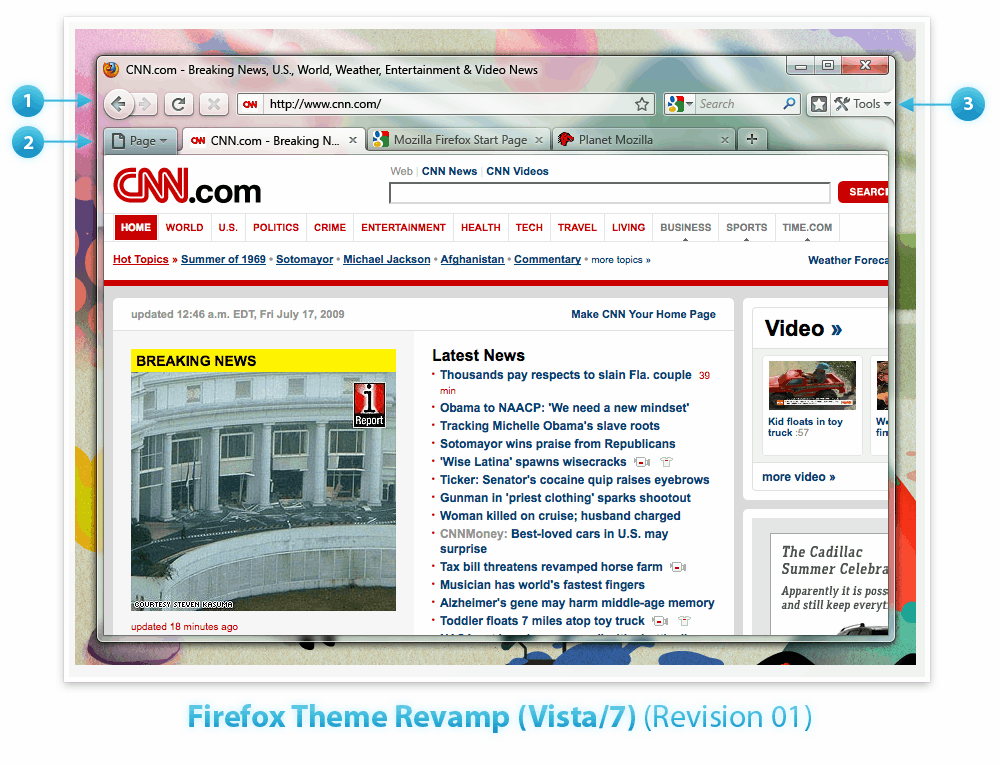
How could version 3.7 and version 4.0 of the Firefox web browser look like? That’s something that the Mozilla development team tried to answer by posting design mockups of Firefox 4 and Firefox 3.7 at the Mozilla Wiki website. Firefox 3.7 is obviously the next major release in the Firefox 3 branch while Firefox 4 will be the next big release at the end of the lifecycle of version 3. A new design can be source of all sorts of problems including usability issues which is probably one of the biggest concerns of Firefox users at this point in time.

Firefox 3.7 Design Mockups:

firefox 3.7

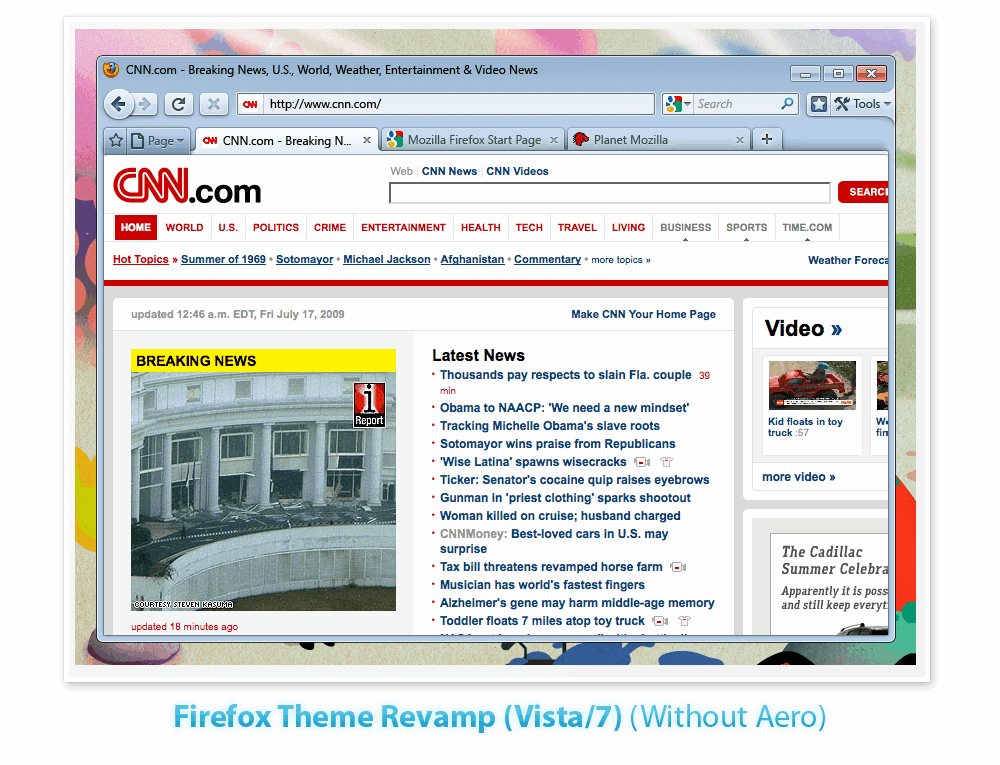
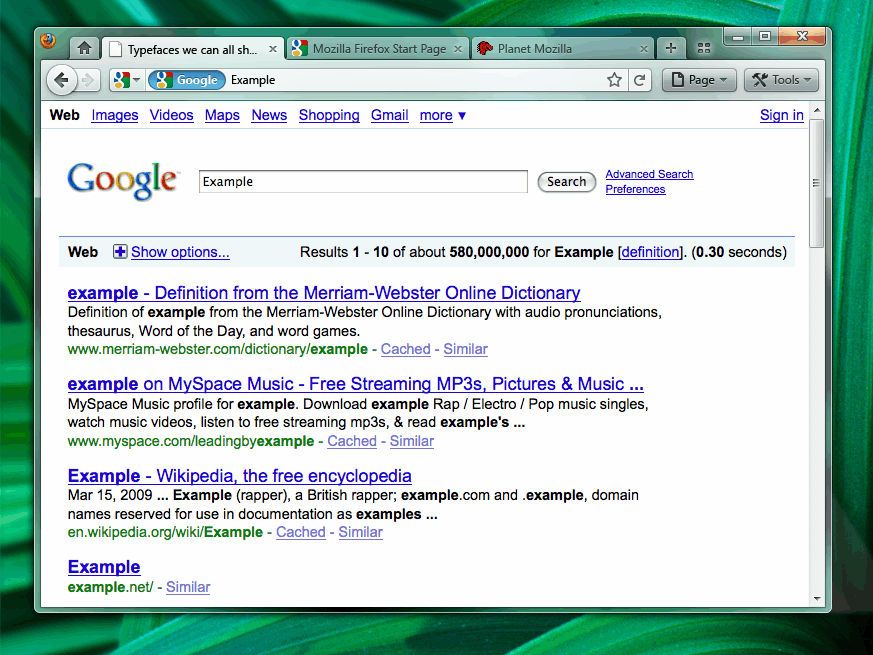
The design mockups of Firefox 3.7 look like they are making use of Aero Glass in Windows Vista and Windows 7. The RSS and bookmark icons have been moved out of the Firefox address bar and the two new entries Page and Tools have been added to the header. Page apparently contains functions and options that are directly related to the active page while Tools will be used for changing the UI of the web browser. Tabs are now rounded as well.

firefox 3.7

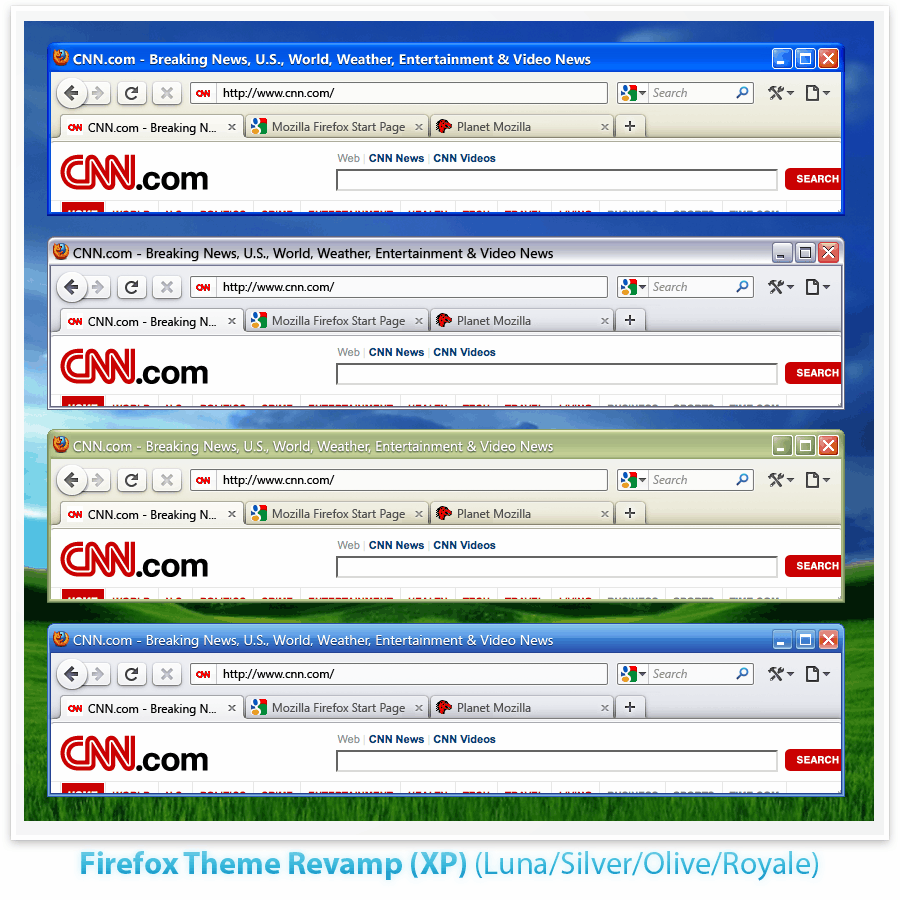
The design for Windows XP is basically the same as for Windows Vista sans the Aero Glass effects.


firefox 3.7

Firefox 4.0 Design Mockups:

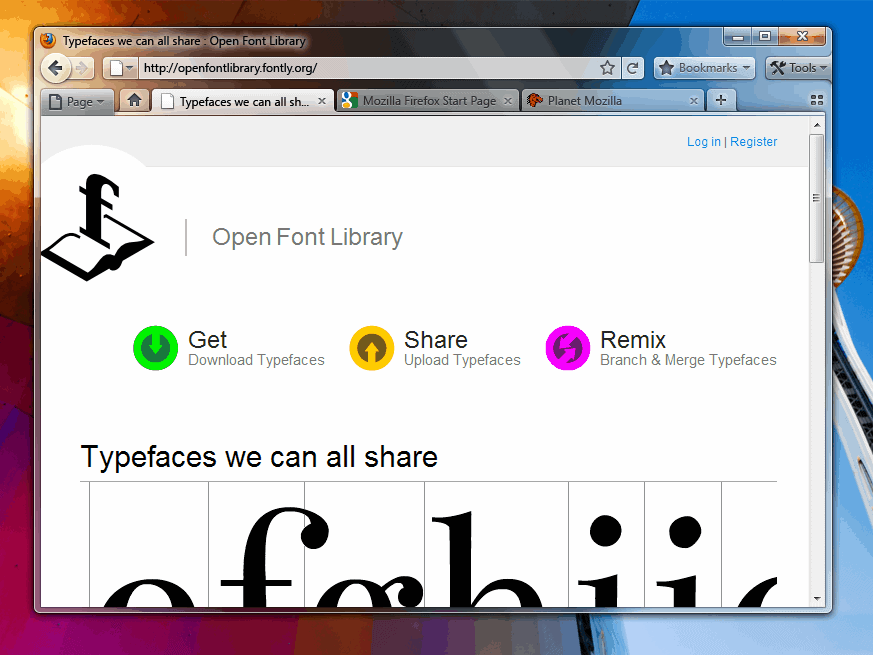
Two different design mockups have been posted for Firefox 4. The main difference lies in the location of the tabbar. Firefox 4 version a comes with the tabbar in the usual place while version b moves the tabs to the top of the web browser similar to the tabs in Google Chrome.

firefox 4

firefox 4

Some of the most obvious changes include the absence of the status bar, the unifcation of the address bar with the search bar and a big new bookmarks button. Version b seems to have drawn several design inspirations from the Google browser. It does not come with a title bar anymore which could be a problem for long page titles. The bookmarks button is gone in this release and the page and tools buttons are placed in the tabbar next to each other.

The Mozilla team added a pro and con list to the second design mockup which is addressing all these concerns.

Verdict: Many of the changes proposed can already be done with add-ons which is probably a better way of handling changes. Add-ons allow users to remove the status or title bar, move the tabs on top or combine the address field with the search field. The biggest risk will be design changes that most Firefox users do not like or do not want to cope with. It is possible that the Firefox community will create add-ons that address these problems. It could also be that Firefox users decided to look at alternative browsers instead.


from : http://www.ghacks.net/2009/07/29/firefox-3-7-and-4-0-design-mockups/

Tuesday, June 16, 2009

Opera Unite: a Web server on the Web browser


With Opera 10, we are introducing a new technology called Opera Unite, radically extending what you are able to do online. Opera Unite harnesses the power of today's fast connections and hardware, allowing all of us to help define the future landscape of the Web, one computer at a time. Read about how Opera Unite is going to change the way we interact on the Web on labs.opera.com.

Sunday, May 31, 2009